
Invisible Character Fortnite : How to Get a Two-Word Name
Using an invisible character Fortnite is completely safe. Your account will not be banned. Epic Games has not penalized any player for using a Unicode character in their display name in the history of this feature.
I am Mark, creator of Espaco Invisivel. My tool has helped over 200,000 players use invisible characters across Fortnite, Free Fire, TikTok and Instagram. This guide gives you the exact method that works in 2026 on all platforms.
The invisible character for Fortnite lets you create a two-word display name with a clean gap between the words. The spacebar is blocked by Epic Games. This Unicode character is not.
Get your blank Fortnite name right now
Copy the invisible character in one click. Works on PC, PS5, Xbox, and mobile.
What Is the Invisible Character for Fortnite
The invisible character for Fortnite is a Unicode code point called the Hangul Filler, code U+3164. It is an officially recognized character in the Unicode Standard that the game accepts as a valid letter.
Epic Games blocks the standard spacebar character U+0020 in display names. But U+3164 has a different code. The Fortnite name validation system sees it as a real character and lets it pass. On screen it shows as a blank gap.
It is not a hack. It is not a glitch. It does not exploit any game mechanic. You are using an allowed Unicode character to style how your name looks.
Is There an Invisible Mode in Fortnite
No. There is no invisible mode in Fortnite where your character becomes physically invisible during gameplay. Fortnite does not have a stealth mechanic or incognito mode that hides your character from other players.
If you searched for invisible character fortnite hoping to hide during a match, that is not what this guide covers. What this guide covers is the invisible character for your Fortnite display name. It creates a two-word name with a clean space between the words.
The two concepts are completely different. Invisible mode is a gameplay mechanic that does not exist in Fortnite. Invisible character is a Unicode text feature that works in your account display name right now.
How to Get an Invisible Character in Your Fortnite Name
Getting the invisible character into your Fortnite name takes under two minutes. The process works on PC, PlayStation 4, PlayStation 5, Xbox One, Xbox Series X and Nintendo Switch.
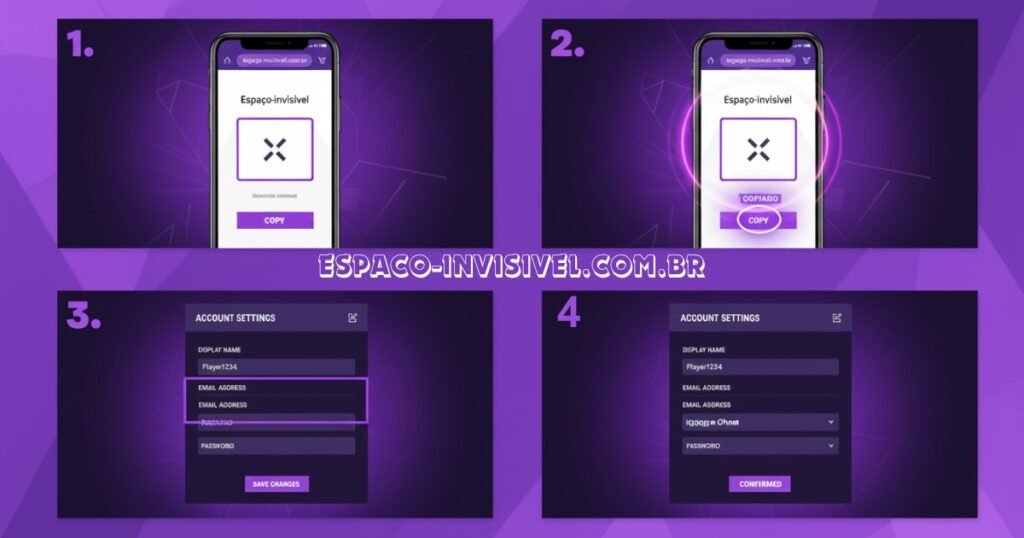
- Open espaco-invisivel.com.br in any browser on your phone or computer.
- Click Copy next to the medium invisible character U+3164.
- Open epicgames.com and log in to your Fortnite account.
- Hover over your profile name in the top right. Click Account.
- Under General settings, find your display name. Click the blue pencil edit icon.
- Type the first word of your new name. Example: Silent
- Right-click in the text field and select Paste. The invisible character goes in.
- Type the second word. Example: Striker
- Click Confirm. Your new two-word name is now live across all of Fortnite.
Pro-Tip: Copy the character and go straight to the Epic Games website without opening other tabs. Some browsers clear the clipboard when you switch tabs. The whole process takes under two minutes if you go directly.
Which Invisible Character Actually Works on Fortnite in 2026
The character that reliably works on Fortnite in 2026 is U+3164, the Hangul Filler. This is the same character our generator provides when you click Copy.
Some older guides suggest using U+200B Zero Width Space or U+00A0 Non-Breaking Space. These may not work consistently in Fortnite name fields. The U+3164 has been tested and confirmed working in March 2026 across all platform versions.
Avoid copying invisible characters from random sites. Some provide incorrect code points or characters that show as a question mark or box in the name field. Always use a trusted generator.
Pro-Tip: Before spending time on the Epic Games website, test the character in a text editor first. Open Notepad on PC or the Notes app on your phone. Paste the character between two words. If you see a clean gap with nothing visible, the copy was successful.
Does the Invisible Character Work in Fortnite Chapter 4 and 2026
Yes. The invisible character U+3164 works in Fortnite Chapter 4 and in the current 2026 season. The display name system has not changed between chapters. Epic Games processes names through the same Unicode validation regardless of which chapter is active.
When a new chapter launches, the in-game map and mechanics change. The account display name system does not change. Your invisible character name carries across every chapter update automatically.
Confirmed working in Fortnite in March 2026. If Epic Games updates their name filter in a future season, the name simply will not save. No ban or penalty. You choose a different name.
Fortnite Name Change: Rules and Limits You Need to Know
Epic Games allows one display name change every 14 days. If you change and then regret it, you wait two weeks before changing again. Choose your two-word name carefully before confirming.
Display names must be between 3 and 16 characters. The invisible character counts as one character. A name like Silent Striker with one invisible space uses 14 characters. That gives you two characters of room.
Names cannot duplicate another active account. If your chosen two-word combination shows as already taken, change the position of the invisible character. Place it before the first word instead of between the two words. Each position creates a technically unique name in Epic’s system.
Why a Two-Word Fortnite Name Looks Better in the Lobby
A two-word name looks more deliberate. It separates you from thousands of players with single-word names or names joined by underscores.
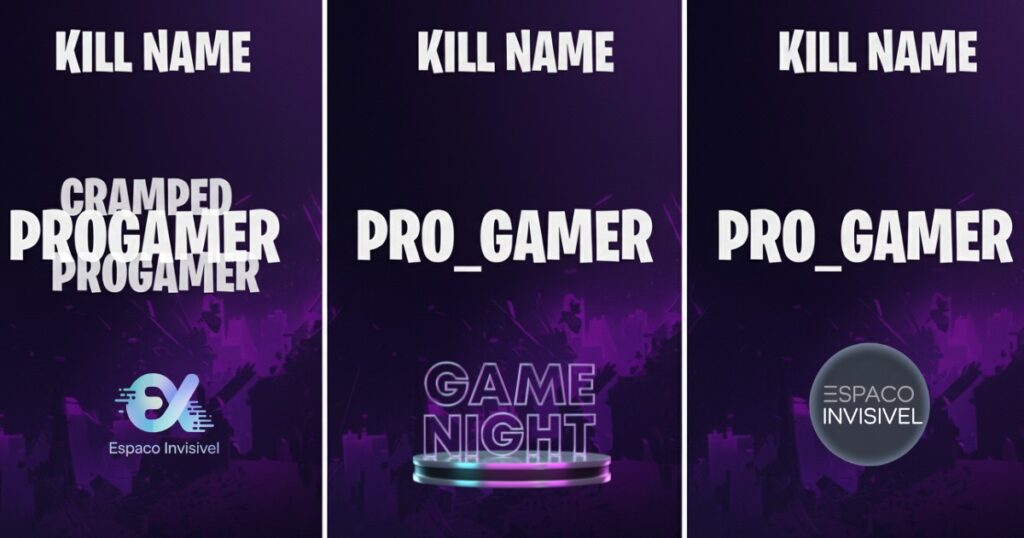
In the kill feed, a name like Dark Wolf reads instantly. ProGamer or Pro_Gamer takes a moment to parse. Streamers and competitive players use two-word names because they are easier to remember and read on screen.
Clan tags work better too. A format like [BR] NomeSeu with clean invisible spacing looks like a professional setup. Squad members with matching formatted names create a visual identity in every lobby.
Other Things You Can Do With the Invisible Character in Fortnite
The invisible character for Fortnite does more than create two-word names. Players use it in several creative ways.
Add space before your name
Place the invisible character at the start of your name. In some lobby views the name appears pushed to the right. It creates a subtle visual difference that makes your profile stand out from everyone else in the list.
Separate your clan tag from your name
Format your name as [TAG] then invisible character then Name. It creates natural spacing that looks professional. Far cleaner than TAG_Name or TAG-Name.
Combine with stylish Unicode fonts
The invisible character works with Unicode font styles. Generate your name in bold, italic, cursive or double-struck font using our font generator. Then add the invisible character between the two words. The result is a name that no one else in your lobby will have.
Ready to go invisible in Fortnite?
One click to copy. Paste into Epic Games. Done.
How to Make Your Skin Invisible in Fortnite
This is a different topic from the invisible character for your name. Making your skin physically invisible during gameplay is not a feature that currently exists in Fortnite through any legitimate method.
Some older viral videos showed a glitch that made skins appear invisible. Epic Games patched those exploits. Using any method to make your character invisible during gameplay violates Epic’s terms of service and can result in a ban.
If you want to create an invisible name for your Fortnite profile rather than an invisible skin, you are in the right place. The method in this guide is safe, legitimate and works in 2026.
Conclusion
The invisible character for Fortnite is the simplest upgrade you can make to your in-game identity today. It takes under two minutes, costs nothing and has no risk to your account.
Go to espaco-invisivel.com.br, copy the U+3164 character, paste it between the words of your new Fortnite display name on the Epic Games website and confirm. Your two-word name is live immediately.
The same invisible character works across Free Fire nicks, TikTok names, Instagram bios and WhatsApp blank messages. One tool, every platform.
Frequently Asked Questions
How do you create an invisible character for Fortnite?
Visit espaco-invisivel.com.br and click Copy next to the medium character U+3164. Then open the Epic Games website, go to Account settings, edit your display name and paste the character between your two words.
Why is my character invisible in Fortnite?
If your in-game character model appears invisible or missing during a match, that is a rendering bug or a graphics driver issue. It is unrelated to the invisible character for your name. Try restarting the game or updating your graphics drivers.invisible character Fortnite
Where is the hidden character in Fortnite?
If you mean a hidden NPC or secret location on the Fortnite map, that changes each season. Check the current season patch notes on the Epic Games website. If you mean the invisible text character for your name, it is available at espaco-invisivel.com.br.
How to type a white space in Fortnite?
You cannot type it directly. The spacebar is blocked in Fortnite name fields. You copy the U+3164 invisible character from our generator and paste it into the name field on the Epic Games website.
Does the invisible character work on Fortnite mobile?
Yes. The Fortnite name change happens on the Epic Games website, not inside the game. Access epicgames.com from your mobile browser, copy the invisible character and complete the name change from any device.
Can you get banned for using the invisible character in Fortnite?
No. Epic Games has never banned a player for using a Unicode character in their display name. The U+3164 is a legitimate character that passes Epic’s name validation. It does not affect gameplay or give any competitive advantage.
How to get a blank name on TikTok using the same method?
The same invisible character U+3164 works on TikTok. Copy it from our generator and paste it into your TikTok display name field. Your name will appear completely blank on your profile.
What are common invisible characters and which works best for Fortnite?
The most common invisible characters are U+3164 Hangul Filler, U+200B Zero Width Space and U+00A0 Non-Breaking Space. For Fortnite names in 2026, U+3164 is the most reliable. It creates a visible gap between words and passes Epic’s name validation consistently.
How long does a Fortnite name change take?
The name change on the Epic Games website takes under two minutes. The new name appears in Fortnite immediately after you log back in. Epic allows one name change every 14 days.

Mark e o criador do Espaco Invisivel. Especialista em
Unicode e caracteres especiais com 3 anos de experiencia.
Mais de 200 mil usuarios atendidos no Free Fire, TikTok,
Instagram, WhatsApp e Discord.


